
 Get demo access
Learning Resources
What should I do if an image takes longer than usual to upload?
The upload speed will generally depend on your internet connection. If you notice that files are taking a long time to load, try the following steps:
1
Check your internet connection and make sure it is stable and fast.2
Ensure that you uploaded the correct image format that complies with Diagnocat's requirements.3
Restart the application or refresh the page in the browserIf the problem persists, please contact customer support using our chat feature
What should I do if Diagnocat is not working as intended?
Please try the following steps:
1
Check your internet connection to make sure it is stable.2
Ensure that the device meets our minimum requirements3
Verify that the CBCT or radiograph image formats meet our requirements.4
Restart the application or refresh the page in your browser.If the problem persists, please contact customer support using our chat feature.
How do I change my account's password?
1
Select "Reset Password" on the Diagnocat login page2
Enter the email address associated with your account in the prompted window.3
Check your inbox for a link allowing you to change your password.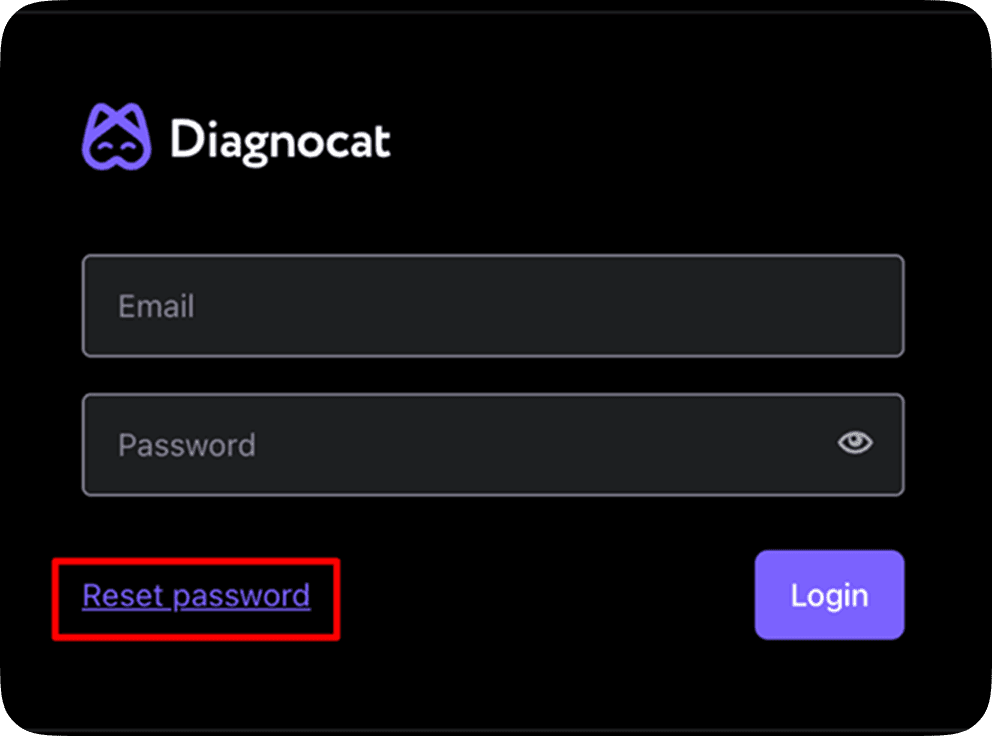
I cannot download the PDF report. “Download PDF” does not work.
Generating a report to print or download takes an average of 20-40 seconds. If nothing happens after this time, please try the following steps:
1
Press Ctrl + P (Cmd+P for Mac users)2
In the prompted window, select "Printer" and "Save as PDF"If the problem persists, please contact customer support using our chat feature.
What should I do if Diagnocat is not working as intended?
Please try the following steps:
1
Check your internet connection to make sure it is stable.2
Ensure that the device meets our minimum requirements3
Verify that the CBCT or radiograph image formats meet our requirements.4
Restart the application or refresh the page in your browser.If the problem persists, please contact customer support using our chat feature.
Download all FAQs in PDF
Get product updates and webinar invitations
Subscribe
See Diagnocat on your own cases.

Book your free demo

Specialists


This page may include information about features and capabilities that may not be available or approved for use in all regions. Regulatory clearance or approval varies by country. To confirm availability and compliance in your region, please contact us. For more legal information, see our Legal Information page. Find our representatives and distributors here.